|
поискавой системы для электроныых деталей |
|
|
поискавой системы для электроныых деталей |
|
RUSB2AC1MB датащи(PDF) 2 Page - StarTech.com Ltd. |
|
|
|||||||||||||||||||||||||||||
RUSB2AC1MB датащи(HTML) 2 Page - StarTech.com Ltd. |
|
|
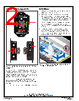
2 / 3 page  TB-9112 Page 2 of 3 © 2021 DESCO INDUSTRIES INC Employee Owned SCS - 926 JR Industrial Drive, Sanford, NC 27332 East: (919) 718-0000 | West: (909) 627-9634 • Website: StaticControl.com A. Status LEDs: Illuminates green when the AC outlet is properly wired and its path to equipment ground via the equipment ground conductor is intact. Illuminates red and audible alarm sounds when the AC outlet is not properly wired and its path to equipment ground via the equipment ground conductor is broken. B. Ground Hub: Brass machined hex block with six banana jacks and six screws for #8 ring terminals. Provides grounding point for wrist straps, ground cords, and tools. C. Power Inlet: Connect the included power cord here. Features and Components Installation 1. Remove the Common Point Ground Monitor and its power cord from their carton. 2. Determine the mounting location of the Common Point Ground Monitor. Its LEDs should be visible to the operator. Secure the Common Point Ground Monitor to a surface using its mounting tabs and the included pan head screws or dual lock fasteners. 3. Connect the power cord to the power inlet located on the right-side of the Common Point Ground Monitor. Connect the opposite end to an appropriate AC outlet. 4. The status LEDs will illuminate green if the AC outlet is wired correctly and its path-to-equipment ground via the equipment grounding conductor is intact. The status LEDs will illuminate red, and the audible buzzer will sound otherwise. Figure 2. Common Point Ground Monitor features and components A A B A C Figure 3. Installing the Common Point Ground Monitor at the end of a row of workbenches |
|
|
ссылки URL |
| Вашему бизинису помогли Аллдатащит? [ DONATE ] |
Что такое Аллдатащит | реклама | контакт | Конфиденциальность | Ссылка на техническое описание | обмен ссыками | поиск по производителю All Rights Reserved©Alldatasheet.com |
| Russian : Alldatasheetru.com | Korean : Alldatasheet.co.kr | Spanish : Alldatasheet.es | French : Alldatasheet.fr | Italian : Alldatasheetit.com Portuguese : Alldatasheetpt.com | Polish : Alldatasheet.pl | Vietnamese : Alldatasheet.vn Indian : Alldatasheet.in | Mexican : Alldatasheet.com.mx | British : Alldatasheet.co.uk | New Zealand : Alldatasheet.co.nz |
|
Family Site : ic2ic.com |
icmetro.com |
 Russian ▼
 English
 Chinese
 German
 Japanese
 Russian
 Korean
 Spanish
 French
 Italian
 Portuguese
 Polish
 Vietnamese
 Indian
 Mexican
 British
 New Zealand