|
поискавой системы для электроныых деталей |
|
|
поискавой системы для электроныых деталей |
|
AS7331 датащи(PDF) 25 Page - ams-OSRAM AG |
|
|
|||||||||||||||||||||||||||||
AS7331 датащи(HTML) 25 Page - ams-OSRAM AG |
|
|
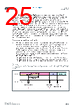
25 / 72 page  Document Feedback AS7331 Functional Description Datasheet • PUBLIC DS001047 • v4-00 • 2023-Mar-24 71 │ 24 In case the Device Operational State (DOS) is set to the measurement mode, the start/stop of measurement is possible by setting the OSR:SS bit and reading measurement data. The power down can be switched on and off by the bit OSR:PD (Figure 45). Switching on power down via the bit O SR:PD = “1”, changes the AS7331 to the power down state after the end of an ongoing measurement. Switching off power down (OSR:PD = ‚0‘) results in a change to the Idle state (IDLE for waiting) or standby state depending on the bit CREG3:SB. This change to another operational state is delayed by the startup time (TSTARTPD) typically of 1.2 ms. A conversion can start in all the measurement modes while the power down state is activated (OSR:PD = “1”). In the measurement modes CMD and CONT, it is done by setting the bit OSR:SS to ‚1‘. In addition, the falling edge of the signal at pin SYN for the measurement modes SYNS and SYND initiate the start. In all cases, the start of the conversion is delayed by the startup time (TSTARTPD). After the conversion in the CMD, SYNS and SYND modes, the AS7331 changes back into the power down state, whereas the measurement of the CONT mode is interactive until it is stopped by setting the bit OSR:SS = to “0” before it changes back into the power down state. There are two methods for startup of the AS7331: 1. After applying the power supply voltage, including power-on reset, or after software reset, the OSR:PD bit must be set to “0” via the I²C interface communication. The analog part and the internal clock system start to work along with the defined configuration of the AS7331. Nevertheless, it is still possible to change the configuration in front of the time b) in Figure 18. The Device Operational State changes to the Measurement state to start the measurement (OSR:SS = “1”) without further delay caused by energy-saving options. Figure 18 shows the principle sequence after power-on reset and separated writing of the bits OSR:PD, OSR:DOS, and OSR:SS: a) OSR programming: 02h, after TSTARTPD continuing within only the configuration state, b) OSR programming: 03h, change to the Measurement state – waiting is shown as IDLE, c) OSR programming: 80h, start of the measurement as stated in t he device’s configuration. Figure 18: Principle Sequence After Power-On Reset and Separated Writing of the Bits OSR:PD, OSR:DOS and OSR:SS POWDOWN MEASUREMENT CONFIGURATION IDLE STATE TSTARTPD I²C activity Start OSR:SS ← ‚1' c) OSR:DOS 011b b) OSR:PD ← ‚0' a) |
|
ссылки URL |
| Вашему бизинису помогли Аллдатащит? [ DONATE ] |
Что такое Аллдатащит | реклама | контакт | Конфиденциальность | Ссылка на техническое описание | обмен ссыками | поиск по производителю All Rights Reserved©Alldatasheet.com |
| Russian : Alldatasheetru.com | Korean : Alldatasheet.co.kr | Spanish : Alldatasheet.es | French : Alldatasheet.fr | Italian : Alldatasheetit.com Portuguese : Alldatasheetpt.com | Polish : Alldatasheet.pl | Vietnamese : Alldatasheet.vn Indian : Alldatasheet.in | Mexican : Alldatasheet.com.mx | British : Alldatasheet.co.uk | New Zealand : Alldatasheet.co.nz |
|
Family Site : ic2ic.com |
icmetro.com |
 Russian ▼
 English
 Chinese
 German
 Japanese
 Russian
 Korean
 Spanish
 French
 Italian
 Portuguese
 Polish
 Vietnamese
 Indian
 Mexican
 British
 New Zealand